Map volumes
Volumetric Features is a way to do various stuff on players when they enter custom created volumes in a map. A volume is rectangular and is created by using two coordinates in the map that defines the three-dimensional area.
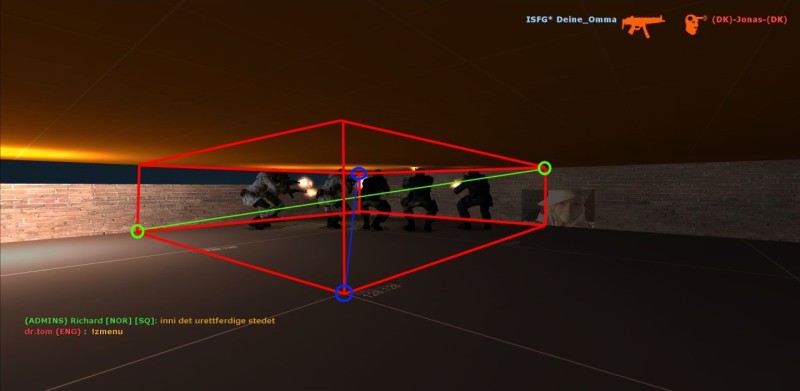
This is a visualized volume where the red border is the volume, and the blue or green circles are examples of what points in the map that could be used.
Known issues/bugs:
- Volumes placed in spawn areas won't take effect on them until they leave the area and go back in. There's a bug where it doesn't apply to spawned players.
- Avoid overlapping volumes of same type. There's currently no conflict handling and whichever volume the player enter or leave last will be triggered.
Volumetric Console Variables Console variable: Default: zr_vol 0 Enables volumetric features.
Options:
0 or 1zr_vol_update_interval 1.0 How often to update player positions and trigger events, in seconds.
zr_vol_trigger_interval 1.0 How often to check for delayed events, in seconds. Use lower values for more precise delays.
Creating A Volume
To create a volume go into spectactor mode (or no-clip). Enable position display in the client (cl_showpos 1), the numbers appear in the top right corner of the scteen. Visualize a rectangular area and move to one of its corners. Get the x, y and z coordinates (make sure you don't miss the "-" if it's a negative number). Go to the diagonally oposite corner, in the oposite height and get the second set of coordinates.
Use the zr_vol_add console command in map configs to add volumes.
Short summary:
- Go into spectator mode or no-clip
- Enable position display: cl_showpos 1
- Go to one of the corners, get the coordinates
- Go to the diagonally oposite corner, in the oposite height and get the second set of coordinates.
- Use these coordinates in the zr_vol_add command along with additional attributes.
Note: Make sure all volumes start a little bit below players' feet so they are covered by the volume. Otherwise nothing will happend.
Volume Attributes
Each volume has a set of standard attributes that tell how it should behave and look like. In addition each feature has a set of attributes. All attributes have default values and are not required, except the type attribute.
These are the generic attributes and apply to all volumes:
Generic Volume Attributes Attribute: Value type: Default: type text - Note: This attribute is required!
Specified the volumetric feature type.
Valid options:
anticamp Anti-Camp volume. classedit Class editor volume. teamfilter text "all" Sets the team filtering settings.
Valid options:
all Applies to all players. humans Applies to humans only. zombies Applies to zombies only. delay number 0 Trigger delay. Number of seconds to wait when a player enter the volume before triggering actions. Time is in seconds.
effect text "none" Note: Incomplete, this attribute is ignored.
What effect to apply to the volume
Valid options:
none No effect. wireframe Draw a wireframe. smoke Put smoke in the volume. fire Put fire in the volume. effect_color text "0,0,0" Note: Incomplete, this attribute is ignored.
Color of the effect. RGB format, represented by three numbers from 0 to 255 separated by a comma. Syntax: <red>,<green>,<blue>
enabled boolean 1 Set the initial enabled setting on the volume. Usually this attribute won't be used.
Volume Commands
Volume Commands Syntax: zr_vol_add <x1> <y1> <z1> <x2> <y2> <z2> <type> [params] Creates a rectangular volume in the map.
Parameters:
x1, y1, z1 First set of coordinates. x2, y2, z2 Second set of coordinates. type Volumetric feature type. Described in Volume Attributes. params Additional key-value chain of volume attributes, separated by space. Syntax: attribute=value attribute=value ... zr_vol_remove <volume index> Removes an existing volume in the map.
Parameters:
volume index Zero-based index of volume (ID) to remove. zr_vol_list [volume index] Lists existing volumes in the map, or dumps volume details.
Parameters:
volume index Optional. Zero-based index of volume (ID) to dump. zr_vol_dumpstates <userid|targetname> Dumps a list of all volumes and a indicator whether the target is in it or not.
Parameters:
userid|targetname A SourceMod target string to a single player.
Anti-Camp
The anti-camp feature can be used to force players to leave areas that are considered unfair or not allowed. It uses a timer to trigger actions at a specified interval. In addition warning messages can be displayed to player that enter the volume.
Do not overuse anti-camp volumes in maps, players don't like that. Instead look for alternate solutions like using a class editor volume to set knock back in tubes/vents.
Anti-Camp Attributes Attribute: Value type: Default: interval number 5 Trigger interval. How often to apply actions on players in the volume. Time is in seconds.
action text "damage" What kind of action to apply.
Valid options:
none Do nothing. Useful for just giving warning messages. damage Hurt player. slay Kill player. drug (Incomplete!) Drug player. Players will be un-drugged when leaving volume. ignite Set player on fire. Players will be extinguished when leaving volume. amount decimal 5.0 Specifies amount to apply depending on action type.
Amount type for action:
none (ignored) damage Health points slay (ignored) drug Time in seconds ignite Time in seconds warning text "chat" Where to show warning message.
Valid options:
none Don't show a warning message. chat Display in client's chat area. center Display warning text centered on the screen. menu Display warning in a menu panel, stays open for 30 seconds or when closed. message text "" Note: Incomplete, this attribute is ignored.
Use custom warning message (max 255 byte). Leave blank to use default warning message.
Class Editor
(Docs incomplete.)